Remote Triggered Black Hole (RTBH) is a tool we can use to drop unwanted traffic in BGP networks using the forwarding plane. It’s called a remote trigger because once we have the base configuration on all our routers, we can initiate the black hole by making changes on just the “trigger” router. In this article, I will demonstrate how RTBH works, and how to configure it on Cisco IOS XE.
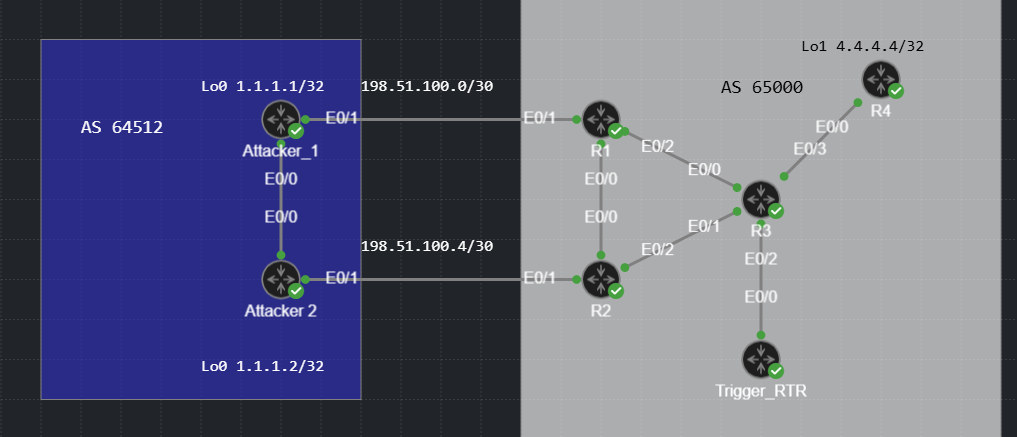
There are two flavors of RTBH. Destination based and source based. Just like it sounds, destination based RTBH allows us to drop traffic to a specific destination host or IP range. Source based RTBH allows us to drop traffic from a specific source IP or range of source IPs. The network shown below will be used for demonstration. The loopbacks on the routers in AS 64512 will be used as the sources we’ll block and the destination will be R4’s loopback 1 interface, 4.4.4.4/32.
Destination RTBH
AS 65000 is a route reflector network where R3 is the reflector, all other routers in the AS are RR clients. On the AS 65000 routers, we need to configure a static route to Null0 using a destination address that we never want to be reachable in network. I used 203.51.100.1/32 in this example.
R1#show running-config | include Null0
ip route 203.51.100.1 255.255.255.255 Null0
The meat of the RTBH configuration takes place on the trigger router. We must create a route map that we can use to set BGP attributes for networks we redistribute into BGP. We also need to configure BGP to redistribute static routes using the route-map shown.
Trigger_RTR#show route-map
route-map RTBH_RM, permit, sequence 10
  Match clauses:
     tag 33
  Set clauses:
    local-preference 200
    community no-export
    origin igp
    ip next-hop 203.51.100.1
  Policy routing matches: 0 packets, 0 bytes
Trigger_RTR#
Let’s examine each route-map setting closer.
- Match – tag 33. We will apply this tag on any static routes that we want to match and be redistributed into BGP. The static route will match the traffic we want to discard.
- Set local-preference 200 – This is to ensure that the redistributed route is preferred over any other route for the interesting network. In a real deployment, you may want to set this to the maximum value.
- Set community no-export – BGP speakers that receive a route with this community must not advertise the route to any external AS. This ensures that our RTBH routes to not leak to other ASNs. Ensure you have community propagation enabled!
- Set Origin IGP – This sets the origin code to the more preferred value instead of the “unknown” that a redistributed route would normally have. This is a 2nd step to ensure that our RTBH BGP route is installed in the RIB.
- Set ip next-hop 203.51.100.1 – This next hop matches the static route destination on the AS 65000 routers we saw earlier. This is the magic of RTBH. If we redistribute routes into BGP and set this next hop, the recursive resolution of the BGP next hop will match the null0 static route, causing traffic to be discarded.
Here is the BGP configuration on the trigger router. Nothing fancy, static redistribution with the route map we’ve already reviewed.
Trigger_RTR#show run | section bgp
router bgp 65000
bgp log-neighbor-changes
redistribute static route-map RTBH_RM
neighbor 3.3.3.3 remote-as 65000
neighbor 3.3.3.3 update-source Loopback0
neighbor 3.3.3.3 send-community both
Before we trigger RTBH, let’s verify that the Attack routers can reach 4.4.4.4 and look at the routing table entries on R1 and R2 for the target network.
Attacker_1#ping 4.4.4.4 source 1.1.1.1
Type escape sequence to abort.
Sending 5, 100-byte ICMP Echos to 4.4.4.4, timeout is 2 seconds:
Packet sent with a source address of 1.1.1.1
!!!!!
Success rate is 100 percent (5/5), round-trip min/avg/max = 3/3/5 ms


Attacker_2#ping 4.4.4.4 source 1.1.1.2
Type escape sequence to abort.
Sending 5, 100-byte ICMP Echos to 4.4.4.4, timeout is 2 seconds:
Packet sent with a source address of 1.1.1.2
!!!!!
Success rate is 100 percent (5/5), round-trip min/avg/max = 4/4/5 ms

R1#show ip route 4.4.4.4
Routing entry for 4.4.4.4/32
  Known via "bgp 65000", distance 200, metric 0, type internal
  Last update from 3.3.3.5 01:03:17 ago
  Routing Descriptor Blocks:
  * 3.3.3.5, from 3.3.3.3, 01:03:17 ago
      opaque_ptr 0x7787ED7F2CE8
      Route metric is 0, traffic share count is 1
      AS Hops 0
      MPLS label: none

R1#show ip cef 4.4.4.4
4.4.4.4/32
  nexthop 10.0.0.6 Ethernet0/2

R2#show ip route 4.4.4.4
Routing entry for 4.4.4.4/32
  Known via "bgp 65000", distance 200, metric 0, type internal
  Last update from 3.3.3.5 01:03:38 ago
  Routing Descriptor Blocks:
  * 3.3.3.5, from 3.3.3.3, 01:03:38 ago
      opaque_ptr 0x72BD56BFE8C0
      Route metric is 0, traffic share count is 1
      AS Hops 0
      MPLS label: none

R2#show ip cef 4.4.4.4
4.4.4.4/32
  nexthop 10.0.0.10 Ethernet0/2
Now that we’ve validated that connectivity works, lets take the “big hammer” approach and drop all traffic destined to 4.4.4.4/32 using destination RTBH. All we need to do is jump on the Trigger router and configure this static route: ip route 4.4.4.4 255.255.255.255 Null0 tag 33. This will match the route map and be redistributed into BGP with next hop 203.51.100.1.
RTBH verification. The most apparent way to know that the black hole is working is to examine R1 and R2’s CEF entry for 4.4.4.4.
R1#show ip cef 4.4.4.4
4.4.4.4/32
  nexthop 203.51.100.1 Null0
R2#show ip cef 4.4.4.4
4.4.4.4/32
  nexthop 203.51.100.1 Null0
The next hop is now via Null0. Let’s take a closer look at the BGP and routing table entry on R1. We have the expected BGP attributes and next hop that we set via the route-map on Trigger_RTR.
R1#show ip bgp 4.4.4.4/32
BGP routing table entry for 4.4.4.4/32, version 21
Paths: (1 available, best #1, table default, not advertised to EBGP peer)
  Not advertised to any peer
  Refresh Epoch 2
  Local
    203.51.100.1 from 3.3.3.3 (3.3.3.3)
      Origin IGP, metric 0, localpref 200, valid, internal, best
      Community: no-export
      Originator: 3.3.3.4, Cluster list: 3.3.3.3
      rx pathid: 0, tx pathid: 0x0
      Updated on Mar 1 2026 20:47:02 UTC
If we check the recursive route lookup for the BGP next hop, we will see the static route we examined earlier.
R1#show ip route 203.51.100.1
Routing entry for 203.51.100.1/32
  Known via "static", distance 1, metric 0 (connected)
  Routing Descriptor Blocks:
  * directly connected, via Null0
      Route metric is 0, traffic share count is 1
The attacker routers are no longer able to reach 4.4.4.4. Mission accomplished!
Attacker_1#ping 4.4.4.4 source 1.1.1.1
Type escape sequence to abort.
Sending 5, 100-byte ICMP Echos to 4.4.4.4, timeout is 2 seconds:
Packet sent with a source address of 1.1.1.1
.....
Success rate is 0 percent (0/5)
Attacker_1#

Attacker_2#ping 4.4.4.4 source 1.1.1.2
Type escape sequence to abort.
Sending 5, 100-byte ICMP Echos to 4.4.4.4, timeout is 2 seconds:
Packet sent with a source address of 1.1.1.2
.....
Success rate is 0 percent (0/5)
Source Based RTBH
Source Based RTBH lets us discard traffic from specific sources by coupling RTBH with Strict Unicast Reverse Path Forwarding (URPF). URPF allows a router to look at the source IP of a packet and verify if the packet was received on the same interface that the router would use to reach the source.
Consider the topology again. If R1 Eth0/1 receives a packet from 1.1.1 on Eth0/1, this will pass the URPF check. If R1 received a packet from 1.1.1.1 on Eth0/2, this would probably fail the RPF check, assuming all links are up and routing is working normally.
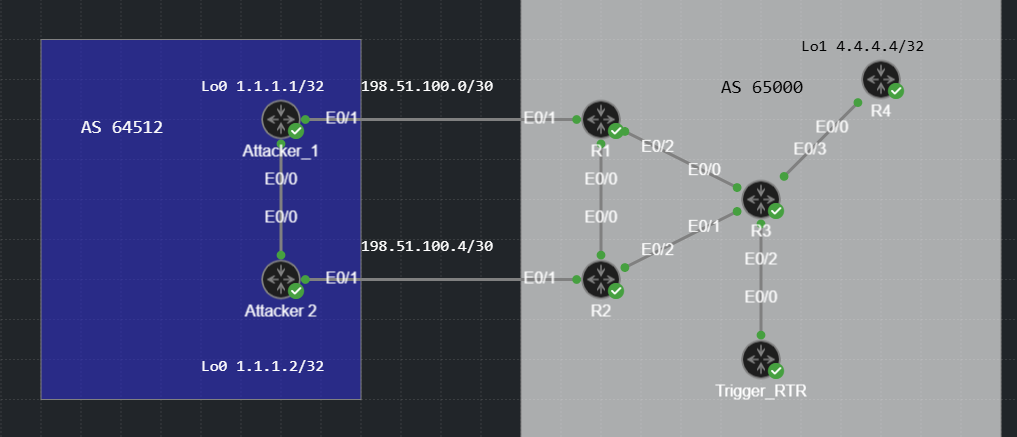
If we cause R1 to have a route to 1.1.1.1 via Null0, the traffic will fail the URPF check and be discarded. R1 and R2 have strict URPF configured on E0/1 using the “IP verify” command shown.
R1#show run interface ethernet0/1
Building configuration...

Current configuration : 133 bytes
!
interface Ethernet0/1
 ip address 198.51.100.2 255.255.255.252
 no ip unreachables
 ip verify unicast source reachable-via rx
end
On the trigger router, we can cause all traffic from 1.1.1.0/24 to be discarded by configuring the static route shown, with the tag so it is matched by our route map. Keep in mind that the route injected for RTBH must either match or be more specific that the route we already have for the source network.
Enter configuration commands, one per line.  End with CNTL/Z.
Trigger_RTR(config)#ip route 1.1.1.0 255.255.255.0 null0 tag 33
With the source RTBH configured, let’s try the pings again.
Attacker_1#ping 4.4.4.4 source 1.1.1.1
Type escape sequence to abort.
Sending 5, 100-byte ICMP Echos to 4.4.4.4, timeout is 2 seconds:
Packet sent with a source address of 1.1.1.1
.....
Success rate is 0 percent (0/5)

Attacker_2#ping 4.4.4.4 source 1.1.1.2
Type escape sequence to abort.
Sending 5, 100-byte ICMP Echos to 4.4.4.4, timeout is 2 seconds:
Packet sent with a source address of 1.1.1.2
.....
Success rate is 0 percent (0/5)
Success! We can verify that this is source based black holing by souring a ping from Attack_1’s other loopback. Only sources within 1.1.1.0/24 are being discarded.
Attacker_1#ping 4.4.4.4 source 10.10.10.10
Type escape sequence to abort.
Sending 5, 100-byte ICMP Echos to 4.4.4.4, timeout is 2 seconds:
Packet sent with a source address of 10.10.10.10
!!!!!
Success rate is 100 percent (5/5), round-trip min/avg/max = 3/3/4 ms
Attacker_1#
Let’s take a closer look at the URPF discarding logic. Because the packet from 1.1.1.1 came in on Eth0/1 and the exit interface to reach 1.1.1.1 is Null0, it failed the unicast reverse path forwarding check and was discarded.
R1#show ip cef 1.1.1.1
1.1.1.0/24
  nexthop 203.51.100.1 Null0
We can see the number of packets discarded on the interface using the command shown.
R1#show ip interface ethernet0/1 | begin verify
  IP verify source reachable-via RX
   16 verification drops
   0 suppressed verification drops
   0 verification drop-rate
  IP Clear Dont Fragment is disabled
The packets from 10.10.10.10 passed the URPF check and were forwarded normally.
R1#show ip cef 10.10.10.10
10.10.10.10/32
  nexthop 198.51.100.1 Ethernet0/1
RTBH can be hard to describe, especially the source-based version. Hopefully this article and demonstration helped you to understand how RTBH works and how we can configure it. The CML YAML file is linked below if you want to try this in your lab. Thanks for stopping by!
https://github.com/routingloopnet/CML_RTBH/blob/main/RoutingLoop_RTBH.yaml