Intermediate System to Intermediate System, known as IS-IS is a link-state interior gateway routing protocol that was originally designed to route ISO Connectionless Network Protocol (CLNP). IS-IS was standardized in ISO 8473. IS-IS was later extended to route IP. The original IS-IS IP specification was ratified in IETF RFC1195. IS-IS for IP networks is sometimes called Integrated IS-IS. In this article, we will explore the routing metrics in Cisco IOS-XE and IOS-XR implementations.
Demo Network
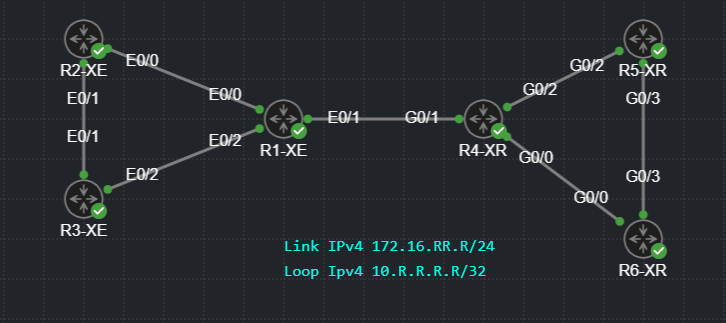
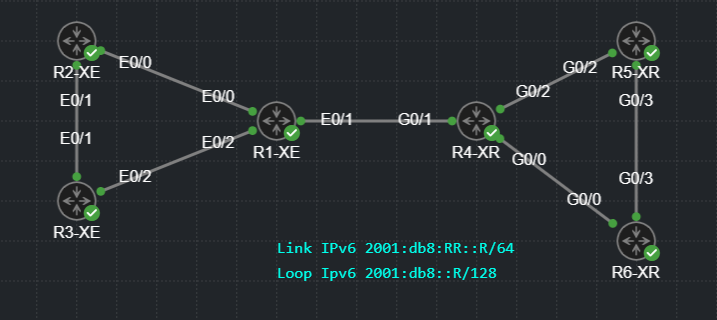
I created the network shown below in Cisco Modeling Labs for demonstration. The hostname suffix indicates the network operating system of the router. The link and loopback addresses indicate the router numbers. Later, the network will be updated for IPv6 review.
Narrow Metrics
Modern IS-IS implementations support two metric types. We’ll start with the original version, known as narrow metrics. RFC1195 specifies four metric fields for internal reachability information. Default Metric, Delay Metric, Expense Metric, and Error Metric. This article will only examine the Default Metric.
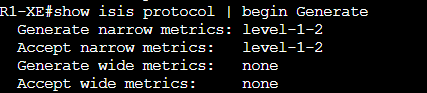
Let’s start by confirming that XE and XR are using narrow metrics. The output below confirms that R1-XE will only generate and accept narrow metrics. This is the default setting.
We can see the same information on XR but in a different format. This also displays the default metric.
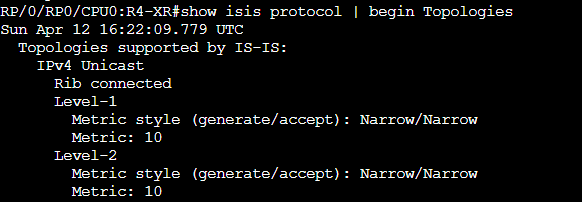
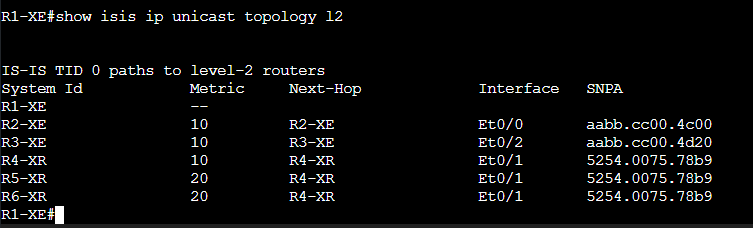
The Cisco XE and XR implementation default to metric value 10 on all interfaces, regardless of any link attributes. Consider the topology again and notice the metric from R1 to all other ISs. The directly connected ISs are reachable with a metric of 10, the hosts that are two hops away have metric 20.
RFC1195 specifies that the Default Metric field is 1 octet long with the two high order bits having specific significance. Bit 8 is reserved and must be set to 0 on transmission and ignored on reception. Bit 7 is used to indicate metric type (internal or external), 0 is used to signify internal metric. This only leaves us with 6 bits to use for the metric itself, meaning that the maximum metric value is 63. This was sufficient for networks when IS-IS was invented but it does not provide enough granularity for modern networks that may have links spanning from less than 1Gbps all the way to 800Gbps.
Context sensitive help in XR confirms the maximum narrow metric. This command can be used to set the default metric for all interfaces where the specified address-family is enabled.

Another major downfall of narrow metrics is the maximum path cost being 10 bits. This means that the total metric for a reachable destination can only be as high as 1023. This could be insufficient for large topologies.
The metric can be specified on interfaces to give different costs to different links. A common approach is to scale metrics to correspond with link bandwidth. On XE, the metric is configured in interface configuration mode. Notice the context sensitive help that suggest values beyond narrow maximum of 63.
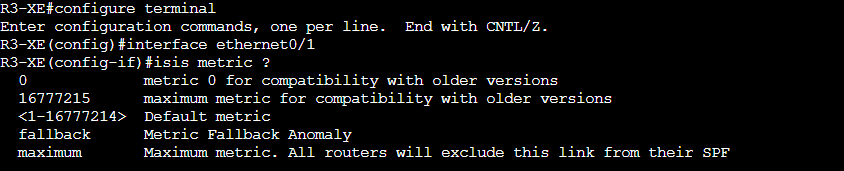
If a value greater than 63 is entered, a warning message is printed on the console.

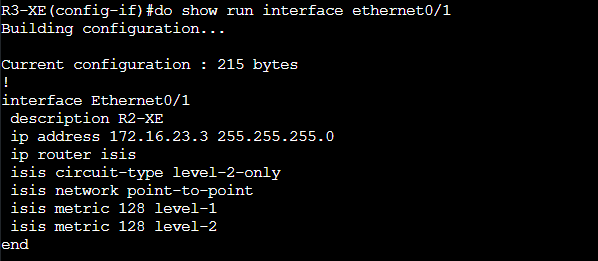
The value is accepted despite this system being configured for narrow metrics. Notice that the single command caused two interface metric statements to be configured.
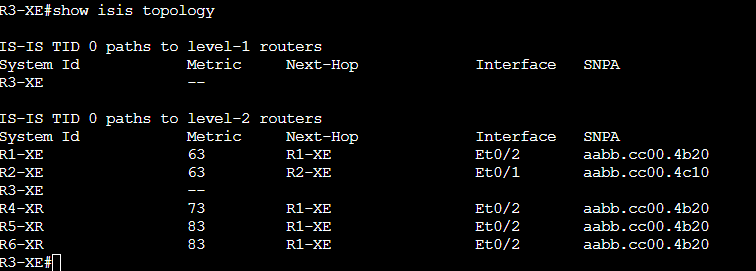
Just like the warning suggests, if a value greater than 63 is entered, it is interpreted to be 63. I confirmed this by setting R3’s E0/1 and 0/2 interfaces to 128 and checking the IS-IS topology. The output shows directly connected ISs R1 and R2 reachable with metric 63.
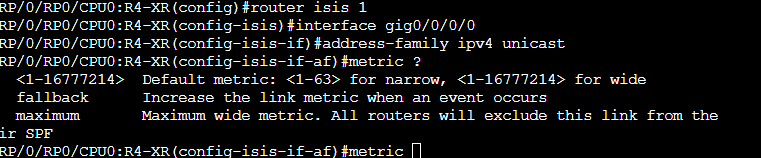
XR allows us to set the interface metric under isis-interface-address family sub configuration mode. This suggests that metrics can be set independently for IPv4 and IPV6.
Wide Metrics to the Rescue!
RFC3784 defined extensions to IS-IS to support traffic engineering. A subcomponent of this extension is what Cisco calls Wide Metrics. These are carried in the Extended IS Reachability TLV, TLV type 22. This expands the metric to 24 bits and maximum path metric of 32 bits. This gives us up roughly 16.7 million for link metrics and 4.2 billion for maximum path metric. That’ll do!
Enabling wide metrics is just a single command. It will cause an outage though, any other routers within the domain will not understand the TLV or its bigger metric. We’ll cover how to overcome this later.

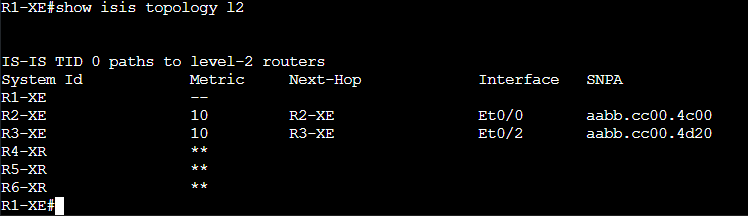
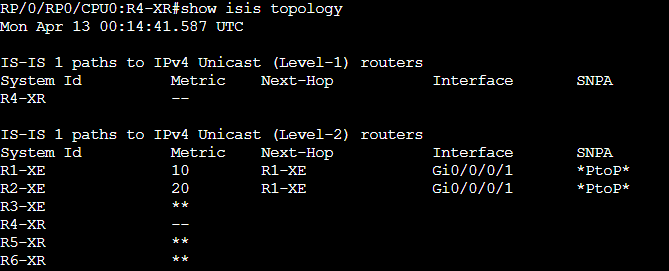
With R4 being the only IS supporting wide metrics, let’s see what this has done to the topology table on R1. R1 only has metric information for the routers behind it. It cannot calculate metric to reach R4 or any of the routers beyond it.
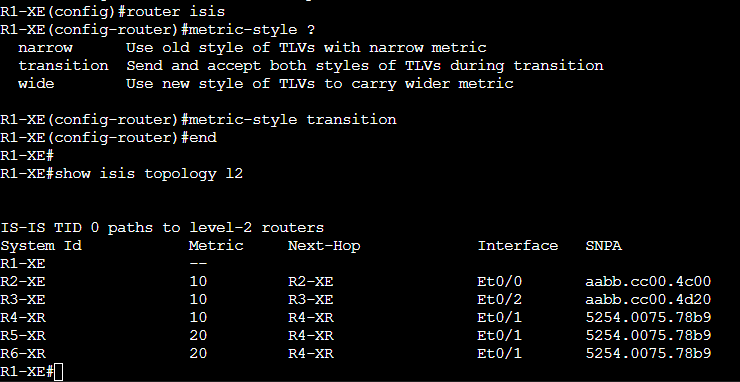
Cisco implemented “transition” mode to help with this scenario. As the context sensitive help describes, this mode will allow an IS to use both metric types. This would allow us to incrementally migrate to wide metrics without causing an outage. As we can see, R1 is now able to accept the wide metric from R4 and calculate the topology for R4 and the routers beyond it.
IPv6 Metrics
IS-IS was extended with new TLVs to support IPv6 in RFC5308. Not much changes with IS-IS itself for v6 support. One caveat is that only extended (aka wide) metrics are used for IPv6, narrow metrics are not supported. I updated the topology to be dual stack utilizing the v6 address plan show in the topology below.
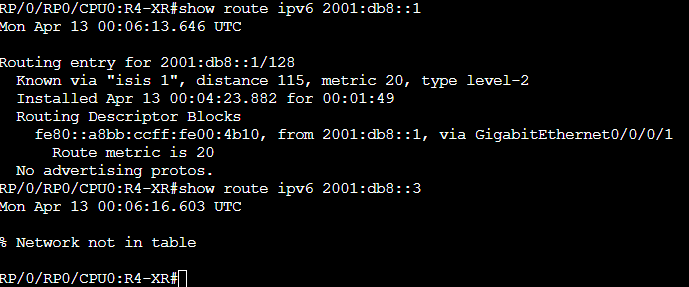
R1-XE and R2-XE are still configured for transition metrics, R3 is still using narrow. Because of this, R4 has a route to R1’s loopback but not to R3’s.
There is one other caveat with introducing IPv6 into this network, but it is not specific to metrics. IOS-XE defaults to IS-IS single topology for dual stack support, XR defaults to multi topology. Single topology means that the same topology is used for both address families, all links must support both address families or traffic blackholing is likely. XR’s default multi topology means that a separate topology is calculated for each address family. These cannot coexist in the same network; all routers must either be single topology or multi topology. I converted R4 to single topology for the sake of demonstration.

The impact of this is apparent in the output below. R4 has no topology information for the XR routers that are still multi topology and none for R3 because of its narrow metrics.
That wraps up this installation at routingloop.net. I hoped you learned a thing or two, I know I did! Thanks for stopping by!