Regular Expressions are a pattern matching utility that have many uses in computing. We can use them on our BGP routers to match autonomous system path entries (or lack thereof) to apply policy to routes. In this article and lab, I will demonstrate a few ways we can use regular expressions (regex) to manipulate routes. The base CML yaml file is available here on my GitHub.
Demo Network
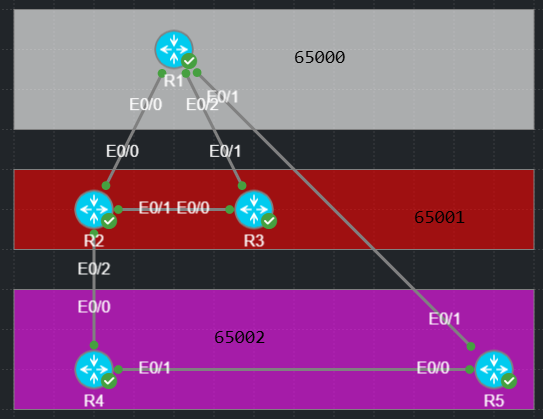
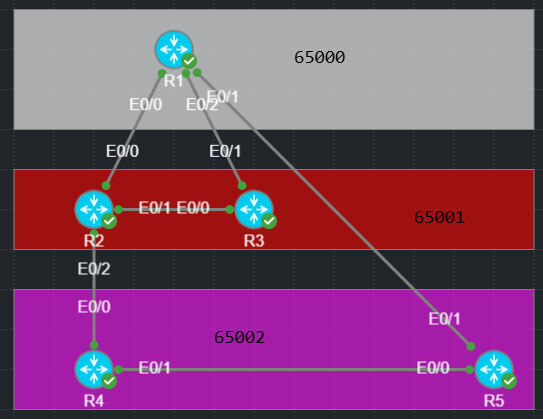
I’ll use the small CML topology shown below. This network is IPv6 only, but the same regex can be used for IPv4, 6, and other address-families. Each router is announcing its loopback v6 address, formatted 2001:db8:5555:R/128 where R is the router number. The transit links are not in BGP but use address scheme 2001:db8:RR:R/64 where RR represents the interconnected routers lower to higher, and R represents the local router number.
Configuring and applying BGP AS Path Regex in the CLI
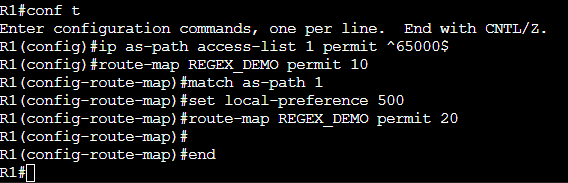
First, we must create an AS path ACL where we define our regular expression. An AS path ACL may have one or more entries, processed from top to bottom. After we have our ACL crafted, we can reference it in a route-map to either simply permit or deny the route or modify attributes of the route. Don’t worry too much about the regex itself yet, the next section will have some examples of regex commonly used for BGP manipulation.
The snippet below shows a basic AS path ACL and route-map. We would then apply the route-map to the BGP process or peers we wish to influence.
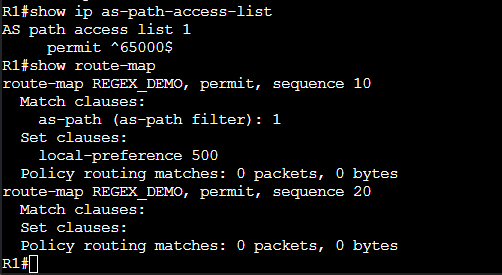
The snippet below displays some show commands we can use to verify our configuration.
Common AS Path Regex Examples
There are many other options, but these are some of the simpler and more common uses.
.* Matches anything
^$ Matches an empty AS path, meaning routes that originated within the local AS
^65000_ Matches routes learned from AS 65000
_65000$ Matches routes originating in AS 65000
_65000_ Matches routes where AS 65000 appears anywhere in the path
^[0-9]+$ Matches routes from any directly connected AS.
AS Path Regex In Action
R1 originates route 2001:DB8:5555::1/128. Without any tinkering, AS 65002 will learn this route from AS 65000 directly and from 65001. By default, AS 65002 will use the path from R5 to R1 directly, the AS path length is shorter than the route through 65001.
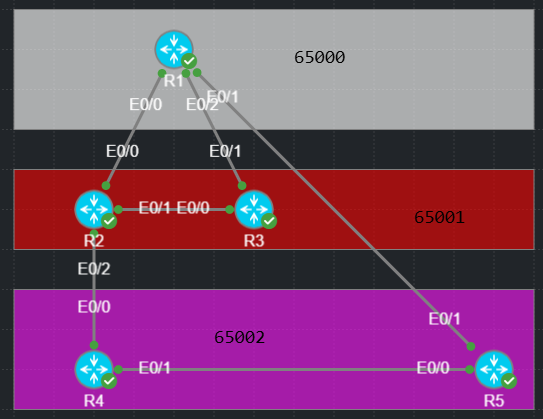
The output below confirms that the 1st route is best because it has the shortest AS path.
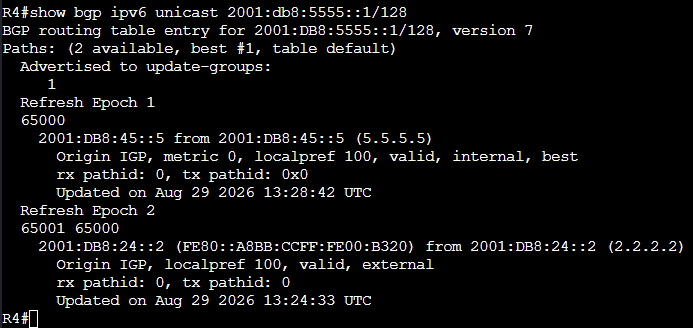
We have a new business requirement that AS 65002 should prefer to use 65001 for transit to reach routes originating in AS 65000. We know that the prefixes may change over time and we do not want to update prefix lists every time there is a change. One option we can use is AS path regex. We can use AS regex and local preference on R4 to prefer using 65001 as transit for these routes. We are not concerned right now with which path 65000 uses to reach 65002.
Before we make changes, we can test our regex pattern matching with show commands. The command shown below lets us query the local BGP table for AS paths with specific attributes. In this case, we expect to only see routes originating in AS 65000. That is, an AS path with 65000 on the far right.
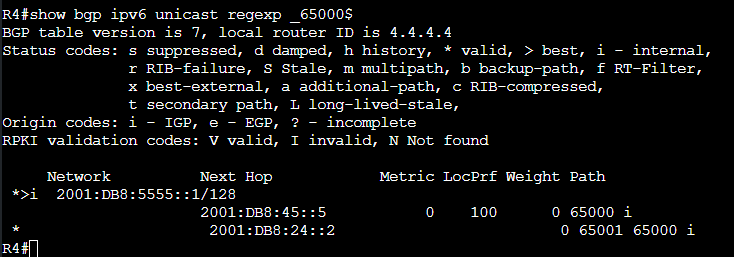
Now that we have a plan, we can start our configurations. First, we need to create the AS path ACL, then a route-map, then apply that route-map to the R2-R4 eBGP session.
The snippet below displays the ACL and route-map creation. Map sequence 10 references the AS ACL, sequence 20 permits any other routes that did not match sequence 10.
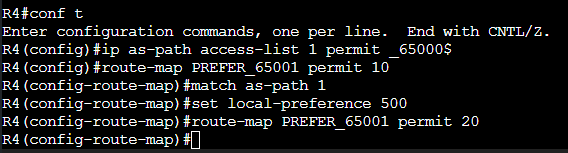
Now we need to apply the route-map to BGP so it can match and influence routing decisions. We apply the map inbound on the R2-R4 peering so that it can match the received routes from 65000 and set the higher local preference to them.

The output below is before the route-map was applied. We confirm again that R4 uses R5 (2001:db8:45::5) as its next hop to reach R1’s loopback.
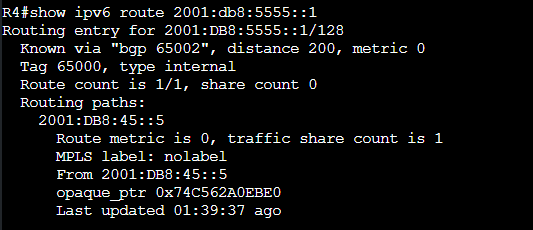
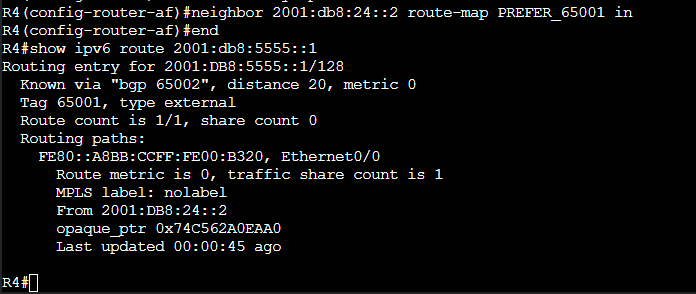
The output after applying the route-map confirms that we are now using R2 as our next hop.
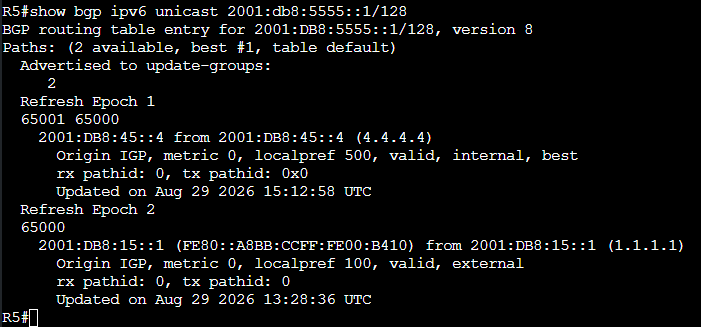
R5’s BGP table entry for 2001:db8:5555::1 is worth reviewing. We can see that it is learning a route directly to AS 65000 for ~5555::1 but we are not using it. The higher local preference (500 vs 100) route from R4 via AS 65001 is best.
Demo 2
R3 uses R2 to reach both loopbacks originating in AS 65002. The only other path it has is though 65000, meaning that the R2-AS 65002 path has the shorter AS path length. We have a new requirement that R3 should transit 65000 for any possible routes. We cannot influence R2s routing decision.
AS path regex to the rescue!
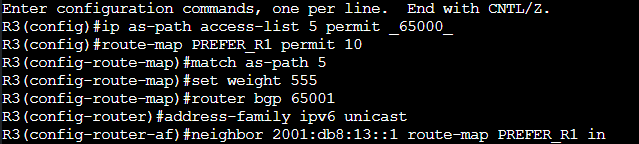
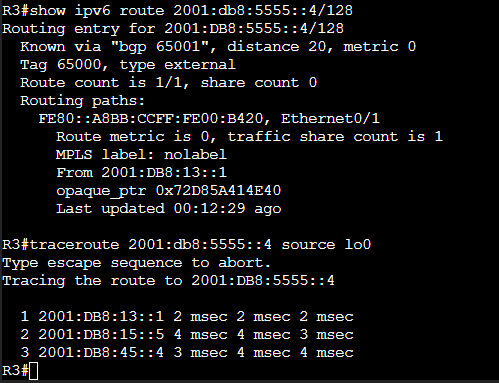
We can match any route with 65000 in the path using the ACL shown. We then use it in a route-map to raise the weight of routes that traverse AS 65000. Remember that we have the requirement to only influence R3 so local preference would not be appropriate. Weight is never advertised to any other router. R2 is only using R3 as the next hop to reach R3s loopback. R3 was never transit for R2.
The routing table and traceroute now confirm that R3 is using R1 > R5 to reach R4.
That’s all for now! This is just a few of many ways we can leverage AS path regular expressions to manipulate routes. I encourage you to experiment in your lab. Thanks for stopping by!